Case Study
Task to complete:
- Create Company in Tally using the details provided in the table 1 and Configure Payroll.
- Create Employee groups for all departments and Add Employees as per the details given in Table 2.
- Create Unit of measurement for the Overtime payment. Formal Name – Hours
- Create attendance Types as Present, Absent and Overtime
- Create Pay Heads for the Earning, Deduction and Employer Contribution components as per the Table 3.
- Define salary for all employees based on Table 3.
- Pass attendance voucher for the month of May as per Table 4.
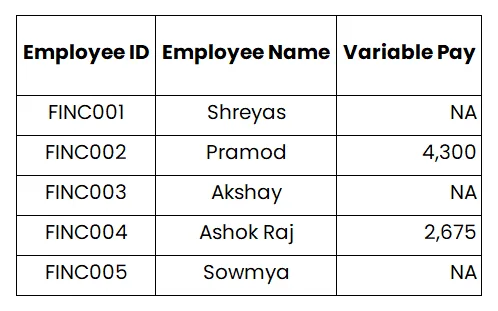
- Process Salary for the month of May including Salary, Variable Pay (Refer Table 5) & Employer Contribution
- Issue Pay Slip to all employees.
- Assume PF, ESI and PT are applicable.
Table 1: Company Details
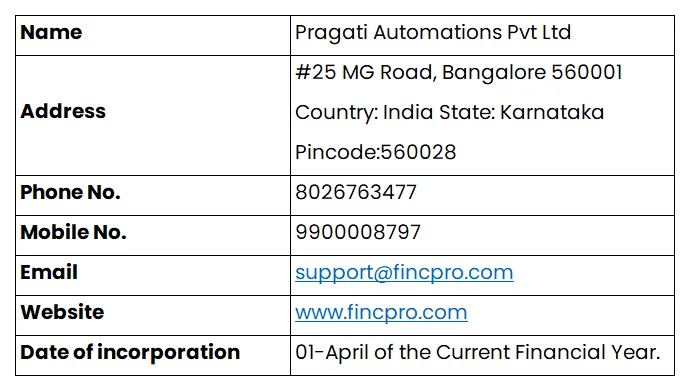
Table 2: Employee Details
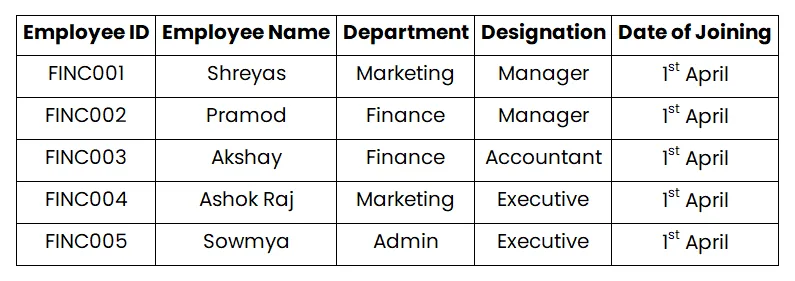
Table 3: Salary Details
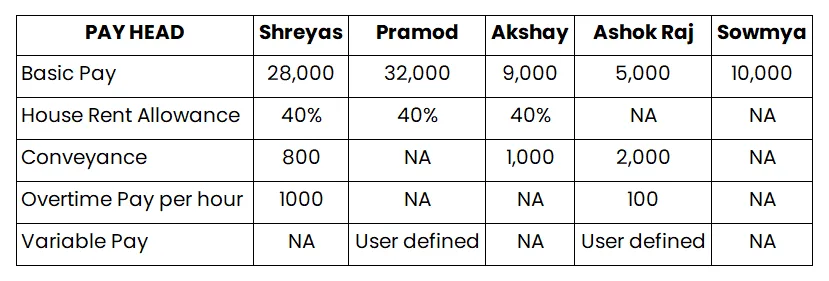
Table 4: Leave and Overtime details for the month of May
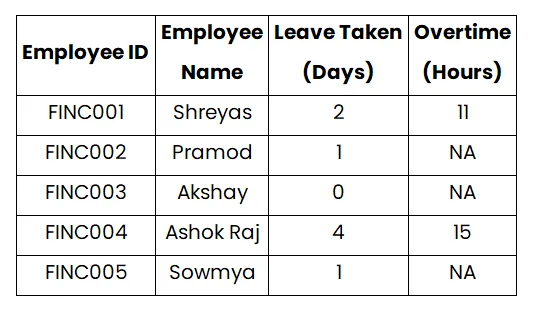
Table 5: Variable Pay details for the month of May
Solution:
Step 1 – Q 1 – Configure the payroll
Step 2 – Q 2 – Create employee group
Step 3 – Q 2 – Create employees
Step 4 – Q 3 – Create Payroll units
Step 5 – Q 4 – Create attendance/Production types
Step 6 – Q 5 – Create Pay heads
Step 7 – Q 6 – Define Salary
Step 8 – Q 7 – Process Attendance
Step 9 – Q 8 – Process Salary
Step 10 – Q 9 – Generate Payslip