Handling TCS
Tax Collected at Source (TCS) is a mechanism where the seller collects tax from the buyer at the time of sale. Understanding and correctly handling TCS is essential for businesses operating in countries where it is applicable. Zoho Books provides features to help you accurately calculate, collect, remit, and report TCS. This section will guide you through the process of handling TCS in Zoho Books.
Understanding Tax Collected at Source (TCS)
TCS is a tax that the seller is required to collect from the buyer at the time of sale. The seller then remits this tax to the government. TCS is applicable to specific goods or transactions, and the rules and rates vary depending on the country’s tax regulations. It’s crucial to determine if your business is required to collect TCS and on which types of transactions.
TCS on Sale of Goods – Section 206C(1H)
Who should collect TCS?
- A seller whose turnover exceeded ₹10 crore in the previous financial year.
When is TCS applicable?
- Sale of goods to a customer exceeds ₹50 lakh in the current financial year
- TCS is collected on the amount received after crossing ₹50 lakh
- Applicable for receipts on or after 1 October 2020
TCS Rates (Section 206C(1H))
| Customer PAN Status | TCS Rate |
|---|---|
| PAN available | 0.1% |
| PAN not available | 1% |
Configure and apply the TCS rates in Zoho Books?
When you create a transaction, if the total sale amount for that customer’s PAN exceeds ₹50 lakhs in that financial year, you will see the TCS field, where you can create and apply the respective TCS rates. To configure:
- Create an invoice for your customer in Zoho Books with all the necessary details.
- In the Total section, click the dropdown near TCS.
- Click Manage TCS.
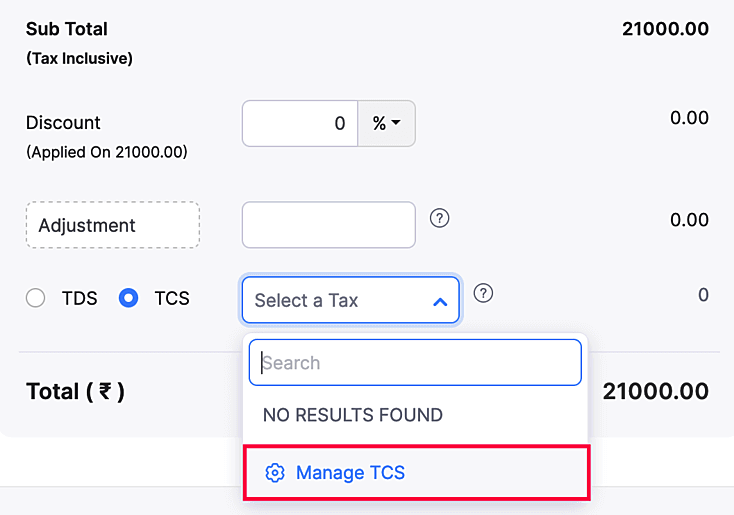
Click + New TCS Tax to create a new tax rate.

Enter the following details:FieldDescriptionNature of CollectionThe reason for collecting TCS and the section under which it is collected.RateThe percentage of TCS collected.Tax NameName of the tax that’s collected. For example, TCS on sale of goods.TCS Payable AccountA liability account used to track the TCS received from the customers.TCS Receivable AccountAn asset account used to track the TCS you’ve paid to your vendor.Start DateThe date when the TCS applicable period starts.End DateThe date when the TCS applicable period ends.
Multiple Choice Question
Summary Table: Handling TCS in Zoho Books
| Step | Description |
|---|---|
| 1. Setup TCS Settings | Enable TCS, enter TAN, create TCS accounts, and configure TCS rates in Zoho Books. |
| 2. Calculate TCS on Invoices | Zoho Books automatically calculates TCS on sales invoices based on applicable rates. |
| 3. Record TCS Collection | Record the TCS amount to the TCS Payable account when payment is received. |
| 4. Remit TCS to Government | Record the TCS remittance to the government by decreasing the balance in the TCS Payable account. |