Choosing Business Location and Tax Editions in Zoho Books
Selecting the correct business location and tax edition in Zoho Books during the initial setup is crucial for accurate financial management and compliance with local regulations. This choice determines how Zoho Books handles taxes, currency, and other location-specific features. This section will guide you through the process and explain the implications of your choices.
Importance of Accurate Business Location
Your business location significantly impacts how Zoho Books functions. It affects:
- Tax Calculations: Zoho Books uses your business location to automatically calculate and apply the correct tax rates based on the applicable regulations (e.g., GST, VAT, Sales Tax).
- Currency Settings: While you can add multiple currencies, your primary business location dictates the default currency for your organization.
- Compliance: Zoho Books provides features tailored to meet the accounting and reporting requirements of specific countries and regions.
- Language and Formatting: The default language and date/number formats are often based on your chosen location.
- Available Integrations: The availability of integrations with local banks and payment gateways can depend on your business location.
Choosing the wrong location can lead to inaccurate tax calculations, incorrect currency conversions, and compliance issues. Therefore, it’s essential to select the correct country and, if applicable, state/province during the organization setup process.
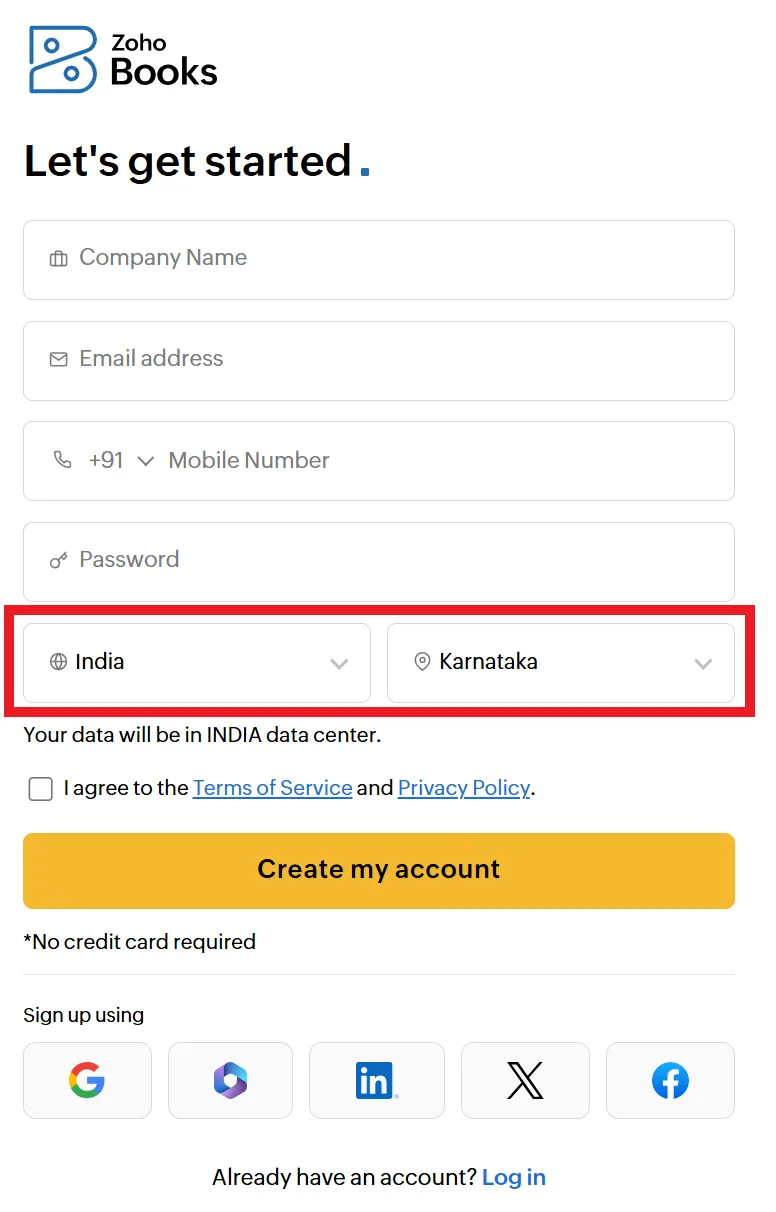
Choose the correct location while signing up: Ensure that you select the correct country and State when creating your Zoho Books account, as this determines your tax settings and localisation.
Tax Editions in Zoho Books: A Detailed Overview
Depending on your business location, Zoho Books may offer different “tax editions.” These editions provide features and settings specific to the tax regulations of that region. For example, there might be a specific edition for businesses in the India, United States, Canada, the United Kingdom, or Australia, each with its own set of tax-related configurations.
Here’s a breakdown of what tax editions typically include:
- Pre-configured Tax Rates: The edition will often come with pre-loaded tax rates for common tax types in your region (e.g., standard VAT rate, sales tax rates for different states).
- Tax Reporting Templates: Zoho Books provides templates for generating tax reports required by your local tax authorities. This simplifies the process of filing your taxes.
- Tax Compliance Features: The edition may include features specifically designed to help you comply with tax regulations, such as automatic tax calculations, VAT return filing, and GST compliance.
- Integration with Tax Agencies: In some cases, Zoho Books integrates directly with government tax agencies, allowing you to submit your tax returns electronically.
Example: GST (India) Edition
The India edition of Zoho Books would include:
- Central Goods and Services Tax (CGST), State Goods and Services Tax (SGST), Integrated Goods and Services Tax (IGST) and Union Territory Goods and Services Tax (UTGST) calculations
- Pre-configured GST rates
- GST reports such as GSTR-1, GSTR-2, GSTR-3B etc.
- E-way bill generation and management
- Integration with GSTN portal for tax filing
Example: United States Edition
The United States edition of Zoho Books would include:
- Sales tax calculations based on state and local tax rates.
- 1099 form generation for independent contractors.
- Options for tracking and managing various types of sales taxes (e.g., state, county, city).
Example: UK Edition
- VAT (Value Added Tax) calculations.
- VAT return filing features.
- Compliance with Making Tax Digital (MTD) requirements.
Choosing the Correct Tax Edition
The selection process is generally straightforward:
- Select Your Business Location: During the organization creation or setup process, you’ll be prompted to choose your business location (country and, if applicable, state/province).
- Zoho Books Suggests the Appropriate Edition: Based on your chosen location, Zoho Books will automatically select or suggest the appropriate tax edition for your business. In most cases, this will be the only option available.
- Verify the Selection: Double-check that the selected tax edition is correct for your business.
- Confirm and Proceed: Once you’ve verified the tax edition, confirm your selection and continue with the organization setup process.
Can I Change the Business Location or Tax Edition Later?
Changing your business location or tax edition after the initial setup is generally **not recommended** and can be complex. It may require significant data migration and configuration changes. In some cases, it might be easier to create a new organization with the correct settings and migrate your data. Therefore, it’s crucial to choose the correct location and edition from the outset.
Table: Impact of Business Location on Zoho Books Functionality
| Feature | Impact of Business Location |
|---|---|
| Tax Calculations | Determines the applicable tax rates and tax calculation methods. |
| Currency | Sets the default currency for your organization. |
| Reporting | Influences the available reporting templates and formats to comply with local regulations. |
| Language and Formatting | Determines the default language, date format, and number format. |
| Integrations | Affects the availability of integrations with local banks and payment gateways. |